

Cal AI Review 2026: Cost, Features & Is It Worth It?
Our Cal AI review examines photo logging, the 3-day trial, pricing offers, and what happened to food tracking after the trial ended.
Shelog Editorial
Reviewed for clarity and care

Best for: People who want fast, simple AI food logging without a lot of nutrition data.

Editorial disclosure: Shelog is also a food-tracking app and therefore a competitor of Cal AI. This review combines our September 2026 hands-on test with the app's published feature information. Prices and availability may differ by region, platform, and offer.
Cal AI takes a simpler approach to calorie tracking than traditional food diary apps. Instead of organizing everything into breakfast, lunch, dinner, and snacks, it focuses on quick food scanning and shows logged foods in chronological order.
We tested Cal AI's onboarding, AI food scanner, nutrition tracking, Groups, subscription flow, and what happens after the free trial ends.
Our biggest takeaway is that Cal AI makes logging food fast and straightforward, but that simplicity comes with trade-offs. Nutrition data is fairly limited, and although a free version technically exists after the trial, we found it extremely difficult to use without paying.
Cal AI at a Glance
| Feature | Our Experience |
|---|---|
| Best for | Fast, simple AI food logging |
| Main strength | Fast, low-effort logging with a simple interface |
| Main drawback | Free version is barely usable after the trial |
| Manual food logging | Premium in practice* |
| Barcode scanning | Premium in practice* |
| AI photo food logging | Premium |
| Nutrition tracking | Calories & macros + limited nutrients (fiber, sugar, sodium) |
| Community / Groups | Free |
| Platform | iOS & Android |
| Free version | Available, but barely usable in our test |
| Free trial | 3 days in our test |
| Price we saw | $29.99/year |
| Special offer we received | $19.99/year |
Table: Cal AI features, pricing, and subscription experience observed during our 2026 test. Offers may vary by account, platform, and promotion.
Our Experience Testing Cal AI
Cal AI's onboarding asks about your goals and lifestyle before taking you into the main app. The process itself was straightforward, but there was an important catch: onboarding ended with a strong push toward starting a subscription trial.
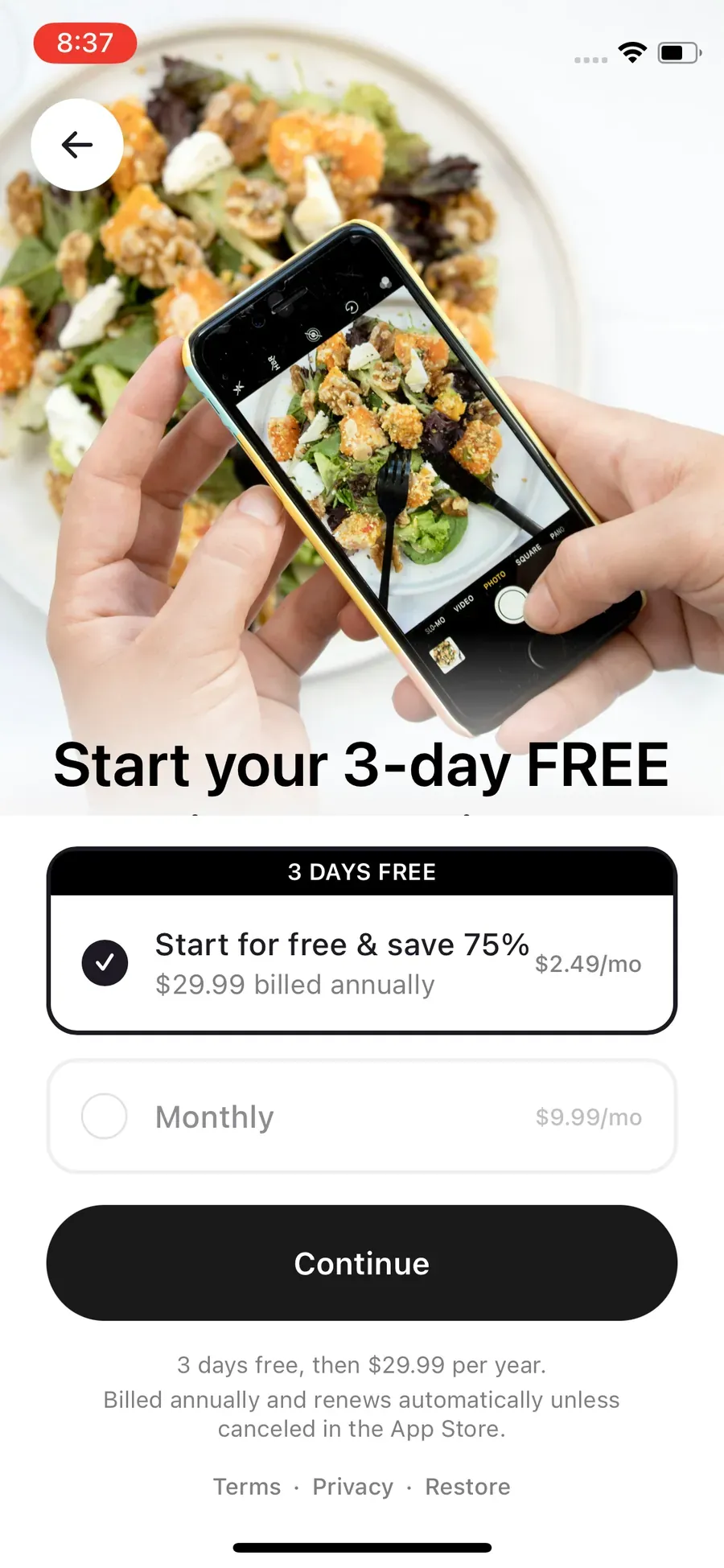
In our test, we could not simply close the subscription screen and continue into a normal free experience. Starting the 3-day trial was effectively presented as the path forward.
Once inside, the app felt much simpler. Foods appeared in chronological order beneath the daily calorie indicator, and the Log menu brought the main actions together in one place.
Cal AI uses a simple chronological diary, with food entries and logging tools accessible from the main screen.
The more important finding came after the trial ended. Cal AI treated us as a free user, so technically a free version exists. But whenever we tried to use the main Log button, the subscription paywall appeared again. In practice, we found it very difficult to continue using Cal AI as an ongoing calorie tracker without paying.
Core Features: How Cal AI Works
Food logging: Cal AI is built around speed. You can photograph a meal, scan a barcode, search the food database, or access other logging options from the Log menu. Foods appear chronologically rather than being separated into breakfast, lunch, dinner, and snacks.
AI food scanning: Cal AI analyzes a meal photo and estimates the foods, calories, and nutrition. In our testing, simple and clearly identifiable foods were easier to assess than complicated meals. Mixed dishes are harder because a photo may not reveal the true portion size, hidden ingredients, sauces, cooking oils, or preparation method. We therefore treated the results as estimates rather than exact measurements.
Nutrition tracking: Cal AI is relatively basic compared with more detailed nutrition trackers. Beyond calories and core macros, the additional nutrient information we saw focused mainly on fiber, sugar, and sodium. That may be enough if you mainly care about calories and macros, but it is limited for people who want extensive micronutrient tracking.
Interface: The minimalist design is one of Cal AI's strengths. There are fewer categories and fewer screens to navigate, so logging a meal feels less like filling out a detailed nutrition spreadsheet.
Groups: Cal AI also includes themed Groups around topics such as weight loss and fitness. We saw several groups during testing, but activity appeared fairly limited, so we see this as an extra feature rather than a major reason to choose the app.
Cal AI includes themed Groups, although the communities we checked did not appear especially active.
Pricing and Subscription
Cal AI's subscription experience is one of the most important things to understand before signing up. During our test, we encountered a monthly option, an initial annual offer, a discounted annual offer, and a Family Plan.
Cal AI Pricing
| Plan | Monthly | Annual | Free Trial |
|---|---|---|---|
| Free | $0 | $0 | - |
| Premium | $9.99 | $29.99 | 3 days in our test |
| Family | - | $59.99* | - |
Table: Cal AI pricing shown during our test. *The $59.99 Family Plan covered up to six members in the offer we saw.
The $9.99 monthly option appeared during our initial subscription flow. After our trial ended, the paywall we received showed only an annual subscription.
The biggest caveat with the Free row is that $0 did not translate into a practical free food-tracking experience for us. After the trial expired, we could enter the app as a free user, but the main logging flow repeatedly led us back to the paywall.
Does Cal AI Offer Discounts?
Yes. We received a lower-priced annual offer after declining Cal AI’s regular subscription screen.
During our initial signup, Cal AI showed us an annual plan for $29.99. When we closed the paywall, the app presented a “gift” and offered us $19.99 per year with a 3-day free trial.
We checked the subscription flow again after our trial ended and our account switched to the free version. At that point, tapping the Log button brought us back to a paywall that only showed the annual plan—the monthly option was no longer available. When we closed that paywall, Cal AI again offered us the $19.99-per-year promotional deal.
So in our testing, the $19.99 offer wasn't limited to the initial signup flow. However, we would still treat it as a promotional price rather than a guaranteed standard rate.
After we declined the initial annual offer, Cal AI presented a “gift” and then a $19.99/year special offer with a 3-day trial.
Free vs. Premium
The distinction between Cal AI Free and Premium is unusual because we technically retained access to the app after the trial, but found the main logging experience difficult to use without encountering the paywall.
| Feature | Free | Premium |
|---|---|---|
| Access the app | ✓ | ✓ |
| AI food scanning | — | ✓ |
| Barcode/manual logging | — | ✓ |
| Calorie & macro tracking | —* | ✓ |
| Groups | ✓ | ✓ |
Table: Cal AI Free vs. Premium based on our post-trial testing.
*After our trial ended, we could still access Cal AI as a free user, but tapping the main Log button repeatedly triggered the paywall. Because this prevented us from meaningfully using the food-logging workflow, we have marked those features as unavailable in the Free column based on our testing.
Cal AI technically gave us access to a free version after the trial, but it didn't function like a practical free food tracker in our test. We could open the app and access some areas, but the main logging workflow repeatedly sent us back to the subscription paywall.
What We Like and Don't Like
What We Like
-
Fast food logging: Cal AI is designed to minimize the time spent recording meals, particularly when using photo scanning.
-
Simple interface: The chronological diary is easy to understand and avoids the clutter that comes with more detailed nutrition trackers.
-
No need to categorize every meal: Foods don't have to be sorted into breakfast, lunch, dinner, and snacks, which makes logging feel less rigid.
-
Useful for quick calorie estimates: If your main goal is getting a rough picture of daily calories and macros, Cal AI keeps the process straightforward.
What We Don't Like
-
The free version is barely usable: After our trial ended, we could still enter Cal AI, but pressing the main Log button repeatedly brought up the subscription paywall. In practice, we found it very difficult to continue tracking calories without paying.
-
The subscription push is aggressive: The paywall was a major part of both onboarding and the post-trial experience.
-
Nutrition data is limited: Beyond calories and macros, the additional nutrient information we saw focused mainly on fiber, sugar, and sodium.
-
AI scans are only estimates: Mixed meals, hidden ingredients, cooking oils, sauces, and unclear portions can make photo-based calorie estimates less reliable.
Who Is Cal AI Best For?
Cal AI is best suited to people who prioritize speed and simplicity over detailed nutrition analysis. It may be especially suitable for:
-
People who want to log meals quickly with AI photo scanning.
-
Users who prefer a simple chronological food diary rather than breakfast, lunch, dinner, and snack categories.
-
People mainly interested in calories and macros rather than extensive micronutrient data.
-
Users willing to pay for a streamlined food-logging experience.
It's less suitable if you want a genuinely useful free food tracker, detailed nutrient analysis, or a more comprehensive nutrition platform.
Frequently Asked Questions
Can I use Cal AI for free?
Technically, yes, but we found Cal AI's free version barely usable. After our trial ended, we could still access the app, but pressing the main Log button repeatedly opened the subscription paywall. In practice, it was difficult to continue using Cal AI as a calorie tracker without paying.
Is there an app like Cal AI but free?


If you mainly want to track food without paying, MyNetDiary and FatSecret provided much more usable free experiences in our testing. MyNetDiary included free search, barcode, and standard voice logging; we were also able to try Meal Scan three times with our free account before being asked to upgrade. FatSecret included free manual logging and barcode scanning. Neither is identical to Cal AI, but both let us do substantially more without subscribing.
How much does Cal AI cost per month?
During our initial subscription flow, Cal AI showed us a monthly price of $9.99. We also saw an annual plan for $29.99, followed by a promotional offer of $19.99 per year with a 3-day trial after we declined the initial offer. After our trial ended, the paywall we received showed only annual billing, so the monthly option was not consistently presented.
Which is better for me, Cal AI or MyFitnessPal?

They suit different types of users. Cal AI focuses on fast, simple photo-based food logging with a minimalist diary. MyFitnessPal offers a much broader food database and more extensive nutrition, recipe, exercise, and meal-planning tools. Cal AI may suit people who prioritize speed, while MyFitnessPal offers more depth.
Is the Cal AI app legit?
Yes. Cal AI is a real calorie-tracking app. That does not mean its AI calorie estimates should be treated as exact measurements. In our testing, photo scanning was most useful as a convenient estimate because photos cannot always reveal portion weight, hidden ingredients, oils, or preparation methods.
Can you trust Cal AI?
We would use Cal AI as a convenient tool for estimating and tracking food intake rather than measuring calories precisely. Simple, clearly identifiable foods were easier to assess in our testing, while mixed dishes can be harder because a photo alone does not reveal every ingredient, portion weight, sauce, or cooking method.
Is it easy to cancel a Cal AI subscription?
In our test, cancellation was straightforward. We subscribed and then canceled through our Apple subscription settings, and checked the subscription again before the trial ended to confirm it had been canceled. Always verify the subscription status through the store account associated with the purchase.
Is Cal AI worth the price?
Cal AI may be worth paying for if speed and low-effort photo logging are your priorities. The $19.99 annual offer we received was relatively inexpensive, but the app is also more limited than some full-featured food trackers. If you want detailed nutrition analysis or a genuinely useful free version, its limitations become much more noticeable.
Official app information
For current feature and subscription details, check Cal AI's official information.
This article is for general education and is not a substitute for personal medical or nutrition advice.
Take Shelog with you
Take Shelog with you
Shelog turns the ideas in this article into a simple daily diary—food, mood, movement, and weight in one calm place.