

Shelog Review 2026: Is It the Best Food Tracking App for Women?
We look at Shelog's visual food journal, AI logging, Routine+ tools, free tier, and pricing—along with where the app is less detailed.
Shelog Editorial
Reviewed for clarity and care

Best for: Women who want an easy, visual, lifestyle-focused way to track food.

Editorial disclosure: Shelog publishes this website and this is our own review of our app, not an independent third-party review. We describe features and offers observed in our September 2026 test; availability and prices may change.
Most food-tracking apps still feel like food trackers: lists of foods, meal categories, and plenty of numbers. Shelog takes a different approach. It combines AI food logging with a visual meal journal and wellness tools in a softer, more lifestyle-focused interface.
We tested Shelog's onboarding, AI food scanner, visual journal, Films, Routine+ tools, Apple Health connection, and subscription offers to see what it is actually like to use.
Our overall impression is that Shelog makes everyday food tracking feel more enjoyable and less like filling in a nutrition spreadsheet. Its biggest trade-off is depth: it works well for calories and macros, but it is not designed for people who want extensive micronutrient analysis.
Shelog at a Glance
| Feature | Our Experience |
|---|---|
| Best for | Women who want a visual, easy food tracker |
| AI photo food logging | Premium |
| Manual food search | Free |
| Nutrition tracking | Calories & macros |
| Visual food journal | Free |
| Routine+ | Premium |
| Meal & workout guidance | Premium |
| Apple Health integration | Yes |
| Account required to start | No |
| Platform | iOS & Android |
| Premium Price | $9.99/month or $49.99/year, $69.99/lifetime |
| Free trial | 3 days |
| Main strength | Beautiful, low-effort visual tracking experience |
| Main drawback | Relatively limited nutrition detail |
Shelog quick facts based on our hands-on testing. Prices and feature access can change by platform, country, and offer.
Our Experience Testing Shelog
Shelog had one of the least intimidating starting experiences among the food trackers we tested. After onboarding, we could enter the free version without creating an account. That made it easier to explore the app before deciding whether to register or pay.
The interface also feels noticeably different from a traditional calorie counter. Soft colors, hand-drawn elements, illustrated cards, and meal photos make the home screen feel closer to a personal wellness journal than a nutrition database.
Shelog keeps the home screen visual and simple, while the Log menu gives quick access to food, exercise, mood, and weight tracking.
That design is not only cosmetic. Instead of spending most of your time looking at rows of numbers, you gradually build a visual record of what you ate. For us, that made routine logging feel lighter and more personal.
Core Features: How Shelog Works
Food logging: Shelog uses a simple central Log button, similar to Cal AI, which makes adding an entry quick and straightforward. Free users can search for food, while the AI-powered options - taking a meal photo with Snap or describing what you ate - require Premium. Exercise, mood, and weight can also be logged from the same menu. After a Snap analysis, you can review the result and adjust ingredients when needed. You also do not have to organize every entry into breakfast, lunch, dinner, and snacks; meals simply become part of your daily record.
After a Snap, Shelog shows estimated calories and macros and lets you review the result before it becomes part of your daily visual journal.
Visual food journal and Films: Meal photos become part of My Journal, creating a visual food wall rather than a conventional diary table. Shelog also lets you apply Film effects to meal photos. In our test, the Film area offered a daily random effect, while additional effects could be collected through the app's reward system.
Films turn logged meals into decorated journal entries; Shelog also gives users opportunities to collect additional photo effects.
Routine+: Routine+ is one of the features that makes Shelog feel different from a standard food diary. It brings together Challenges and Helpers designed for everyday situations that can make healthy routines harder to maintain.
Challenges provide small tasks designed to encourage healthier habits over time.
Helpers are practical tools for specific situations. During our testing, we found options including Hunger Check, which helps you think through whether you're physically hungry or responding to a craving or habit; Craving Reset, a short breathing exercise; Protein Helper, which can suggest protein-focused meals or snacks; and Smart Takeout, which provides calorie and macro information for choices from familiar restaurant chains.
Routine+ combines Helpers and Challenges, including Protein Helper and Smart Takeout tools for everyday food decisions.
Designed With Women in Mind
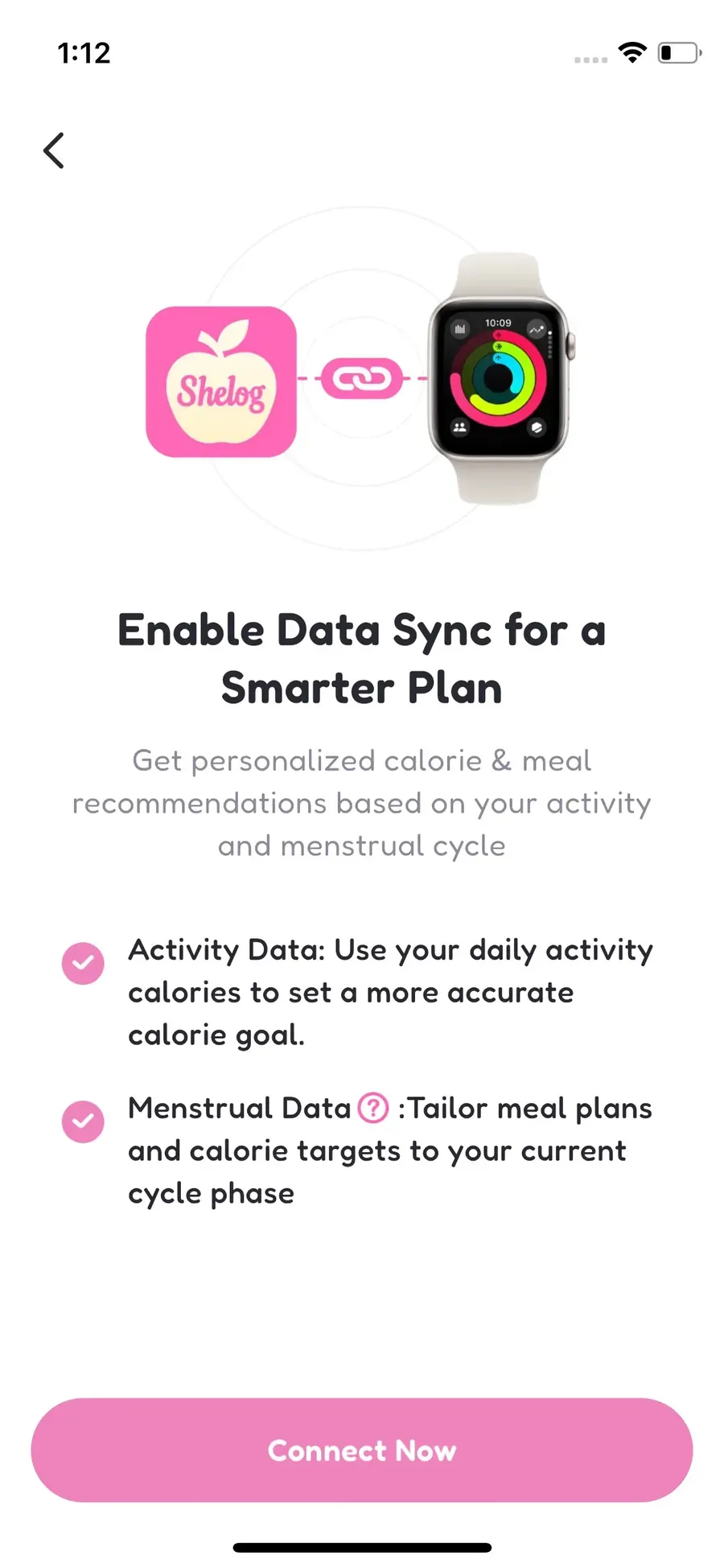
Shelog is designed with women in mind, bringing food tracking together with a broader approach to everyday wellness. When we connected Apple Health, Shelog explained that menstrual data could be used to tailor meal plans and calorie targets to the current cycle phase.
Routine+ also extends the experience beyond simply recording what you eat. Its Helpers and recommendations are designed around everyday situations such as cravings, hunger, protein intake, and choosing takeout, making Shelog feel more like a wellness companion for women than a traditional calorie counter.
Pricing and Subscription
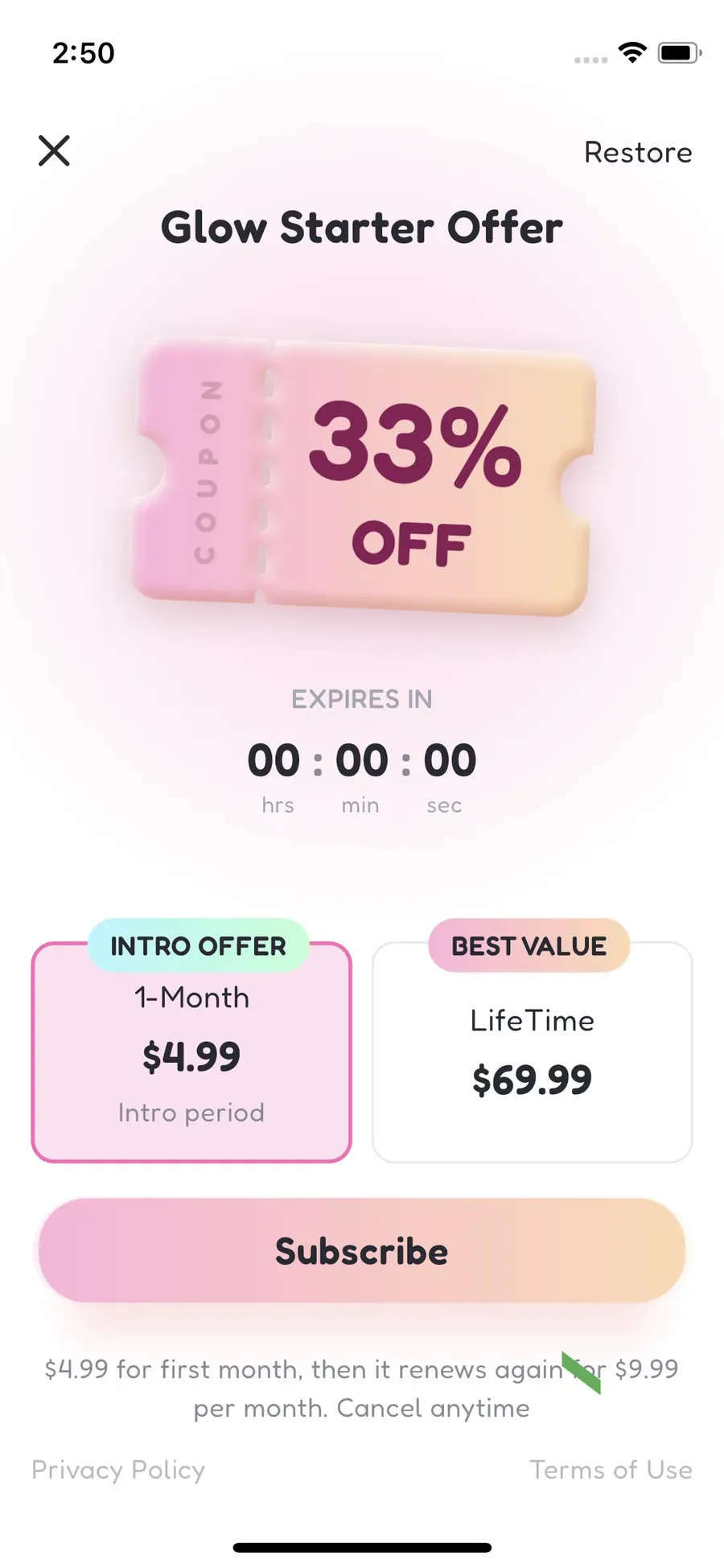
Shelog can be used for free, and we were able to start without creating an account. Paid options are available for users who want the broader Premium experience. During our test, the pricing table showed $9.99/month, $49.99/year, a $69.99 lifetime option, and a 3-day free trial. We also received a $4.99 introductory offer for the first month.
Shelog Pricing
| Plan | Monthly | Annual | Lifetime | Free Trial |
|---|---|---|---|---|
| Free | $0 | $0 | $0 | - |
| Premium | $9.99 | $49.99 | $69.99 | 3 days |
Shelog pricing we saw during testing.
Does Shelog Offer Discounts?
Yes. The monthly price we received was presented as a limited introductory offer. The offer screen showed $4.99 for the first month, followed by a $9.99 monthly renewal price. Check the final checkout terms before subscribing. We also saw a one-time lifetime option for $69.99.
Free vs. Premium
Shelog offered a more usable free experience than several apps we tested. We could enter the app without registering and use basic tracking features such as food search and logging exercise, mood, and weight. Premium unlocks some of Shelog’s more distinctive features.
| Feature | Free | Premium |
|---|---|---|
| Manual food search | ✓ | ✓ |
| AI photo food logging (Snap) | - | ✓ |
| Exercise logging | ✓ | ✓ |
| Mood tracking | ✓ | ✓ |
| Water tracking | ✓ | ✓ |
| Barcode scanning | - | ✓ |
| Weight tracking | ✓ | ✓ |
| Calorie & macro tracking | ✓ | ✓ |
| Routine+ Helpers | - | ✓ |
Shelog feature availability by plan based on the version we tested.
What We Like
-
Easy to get started: We could finish onboarding and enter the app without creating an account or immediately paying. The free version also let us try basic tracking before deciding whether to upgrade.
-
Low-effort AI food logging: Snap makes it easy to photograph a meal, review the estimate, and correct ingredients when needed.
-
A visual journal instead of a spreadsheet: My Journal and Films make food history feel more personal and enjoyable to revisit.
-
Routine+ addresses everyday situations: Helpers such as Hunger Check, Craving Reset, Protein Helper, and Smart Takeout go beyond basic calorie counting.
-
Women-focused health context: Apple Health integration can include menstrual data for cycle-aware meal plans and calorie targets.
What We Don't Like
-
Nutrition detail is limited: Shelog works well for everyday calories and macros, but it is not built for people who want extensive micronutrient analysis.
-
Some useful tools take time to discover: Features such as Films and the different Routine+ Helpers are spread across the app, so the full experience is not immediately obvious.
-
Distinctive features require Premium: Basic food and lifestyle tracking is available for free, but Snap, AI food descriptions, Routine+ Helpers, and recipe recommendations require an upgrade.
-
No prominent in-app community: Unlike food trackers built around social feeds or active groups, Shelog did not offer a major community experience in our test.
Who Is Shelog Best For?
Shelog is best suited to women who want to build healthier eating and lifestyle habits without turning food tracking into a chore. It may be especially suitable for:
-
People who prefer a visual food journal to a traditional diary table.
-
Users who want calories and macros without extensive nutrition data.
-
People who like practical wellness tools for cravings, protein, takeout, meals, and routines.
-
Users who value women-focused health context such as menstrual-data integration.
It is less suitable if your main priority is detailed micronutrient analysis or a highly technical nutrition dashboard.
Frequently Asked Questions
Is Shelog free?
Yes. Shelog has a free version, and in our test we could start using it without creating an account or paying. Free users can search for food and log exercise, mood, and weight. However, features such as Snap, AI food descriptions, Routine+ Helpers, and recipe recommendations require Premium.
Is Shelog a calorie tracker?
Yes. Shelog tracks calories and macros, but its experience is more visual than a traditional calorie diary. Logged meals become part of a photo-based journal rather than being organized primarily around breakfast, lunch, dinner, and snack tables.
Can Shelog scan food from a photo?
Yes. Shelog's Snap feature uses AI to analyze a meal photo and estimate calories and macros. We could also review the result and manually add or remove ingredients when needed.
Does Shelog have meal plans?
Shelog includes meal guidance and recommendations through Routine+ and related wellness tools. In the version we tested, we would describe this as guided meal support rather than a conventional weekly meal planner.
Which is better, Cal AI or Shelog?

It depends on what you want from a food tracker. Cal AI is more focused on fast, straightforward calorie tracking, with a simple interface and AI photo logging at the center of the experience. Shelog takes a broader wellness approach, combining food tracking with mood, exercise, weight, a visual food journal, and Routine+ tools.
Shelog also offered a more practical free experience in our testing. We could search for food and log exercise, mood, and weight for free, although Snap and other AI-powered features required Premium. With Cal AI, the free version became difficult to use for normal food logging after our trial ended.
Does Shelog connect to Apple Health?
Yes. We tested the Apple Health connection screen, which included activity and menstrual data. Shelog explained that menstrual data could be used to tailor meal plans and calorie targets to the current cycle phase.
Is Shelog made for women?
Shelog is designed with women in mind. We saw that positioning most clearly in its visual style and menstrual-data integration, although many of its core food and wellness tools can also function as general health-tracking features.
Is Shelog accurate?
We treat Shelog's photo-based food results as estimates rather than exact measurements. As with other AI food scanners, portion size, hidden ingredients, sauces, and cooking methods can affect the result. Shelog lets you review and correct ingredients after a scan.
Is Shelog worth it?
Shelog is a strong fit for people who value an easy, visual food diary and practical wellness tools more than detailed nutrition analysis. Its free version was genuinely usable in our test, while the paid options add value for users who want the broader premium experience.
If a visual food journal and everyday wellness tools are what you want, download Shelog to explore the free experience before deciding whether Premium is useful for you.
Official app information
For current feature and subscription details, check Shelog's official information.
This article is for general education and is not a substitute for personal medical or nutrition advice.
Take Shelog with you
Take Shelog with you
Shelog turns the ideas in this article into a simple daily diary—food, mood, movement, and weight in one calm place.