

How to Track Calories When Eating Out—Without Knowing Every Ingredient
Learn how to log restaurant meals using menu information, realistic estimates, and meal photos—without double-counting sauces or chasing exact numbers.
Shelog Editorial
Reviewed for clarity and care

Your food arrives just as the conversation gets good. You open your food diary for a quick entry—and find twelve versions of the same dish. None quite looks like your dinner.
To track calories when eating out, start with the restaurant's own nutrition information when available. Otherwise, choose a similar prepared dish or log the main components—not both. Adjust for what you actually ate, check for extras that are not already included, and treat the result as an estimate.
You can make a useful record without reconstructing the kitchen's recipe. The trick is to work with what you know, rather than keep adding guesses about what you don't.
Start With What You Know
Before searching your app, decide which situation you are in. That small choice can save a lot of scrolling.
| What you have | Where to start | What to check |
|---|---|---|
| Nutrition information for your order | The restaurant's current menu, website, or nutrition calculator | Country, size, included sides, and customizations |
| A recognizable dish but no nutrition information | A similar prepared-food entry | Cooking method, main ingredients, and serving description |
| A plate with separate foods or no close match | The main components you can identify | Portion eaten and any additions not already represented |
Choose the approach that fits your meal. If you log a complete dish, you do not need to log its ingredients again underneath it.
When the Restaurant Lists Calories
Use information for the order you actually received, rather than a vaguely similar item with the same name.
In the United States, FDA menu-labeling requirements cover certain chains with 20 or more locations operating under the same name and offering substantially the same menu items. Covered establishments must display calories for standard items and provide additional written nutrition information on request. That does not mean every independent café will have a nutrition sheet.
For a chain restaurant, look for the official menu or nutrition calculator first. Make sure it is for your country, too; an entry from the same brand overseas may not describe your order.
Then check the details that change what you are logging:
- Size: a regular drink, large drink, or refill are different amounts.
- What is included: an entrée may be listed alone or with its standard side and sauce.
- Your changes: an added topping or a substituted side may need a different entry.
- How much you ate: a listed serving describes the food supplied, not necessarily the food you finished.
If your app has a matching entry, compare it with the restaurant's information before saving. A familiar logo is useful, but the serving description still matters.
Are restaurant calorie counts exact?
They are useful reference information, not a measurement of your individual plate. In a 2011 JAMA study of selected chain-restaurant foods, measured calories were close to stated calories on average, but individual items varied. The food was sampled in 2010; the study does not tell us the error in your dinner today.
Use the listed information as your starting point. It need not be perfect to be useful, and this study is not a reason to add a fixed percentage to every restaurant meal.
When There Is No Nutrition Information
At a neighborhood restaurant, you may know the dish and little else. Start with the menu description and what is on your plate. Choose one of the following approaches.
Choose a similar prepared dish
This is often the simplest option for mixed dishes such as curry, lasagna, or fried rice, where separating every ingredient would involve more guessing than observation.
Look for a match in how the dish is made and what is in it, not just its name. Plain cooked pasta will miss much of what is in a creamy pasta dish. Likewise, skinless grilled chicken is not a close match for fried chicken.
Read what “one serving” means. It might refer to a cup, a stated weight, an entire container, or an unspecified portion. If the amount is unclear, try another entry with a more usable description. The first search result is not necessarily the best fit.
A similar dish is still an estimate of your meal, not the restaurant's recipe. Once you have a sensible match, it is fine to leave some uncertainty in the entry.
Log the main components
For a plate with distinct foods, it may be easier to record the visible parts separately: the fish, rice, vegetables, and a separately served sauce, for example.
Use entries that describe the food as served. If you are estimating cooked rice on your plate, do not accidentally select a dry-rice serving. Where the app offers household measures, use a rough amount you can reasonably judge rather than inventing a precise gram weight.
If a quick question would clear something up, ask—whether a sauce is cream-based, for instance. There is no need to turn ordering dinner into an interview about every ingredient.
A simple example: salmon, rice, and vegetables
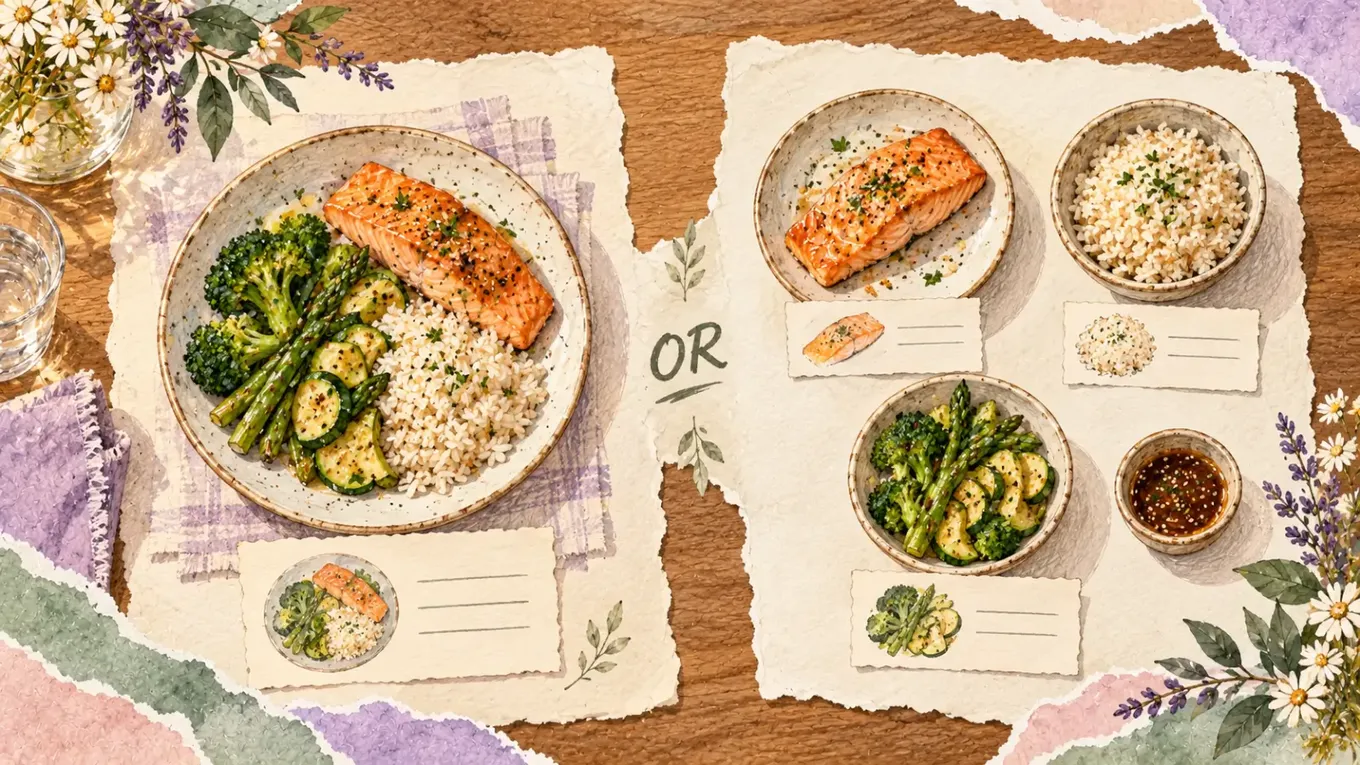
Imagine you order a salmon plate with rice, vegetables, and a small pot of sauce.
You could choose a comparable complete salmon-and-rice plate if the description fits. Alternatively, you could record the salmon, cooked rice, and vegetables separately, then consider the sauce you used.
What you would not do is log the complete plate and add another full portion of rice and salmon underneath it.
The same applies to cooking fats and dressing. Before adding anything, check whether your chosen entry already represents a prepared dish with those ingredients. Add a separate item for an actual extra or an ingredient missing from the entry—not simply because the kitchen might have used some.
Some details will stay unknown. Adding guessed oil, then guessed butter, then a final “just in case” buffer gives you a bigger number—not necessarily a better estimate.
Shared Plates, Leftovers, and Takeout
For shared food, record your share—not the serving platter. If four people split a dish roughly equally, about a quarter is a reasonable starting estimate. If you had noticeably more or less, adjust accordingly. With several shared dishes, think about what reached your own plate rather than dividing the entire table's order evenly.
For leftovers, estimate the portion eaten. If you ate about half, use approximately half of the full-dish entry. When the meal has separate components, a single fraction may not fit: finishing the fish but leaving most of the rice calls for a different estimate than eating half of everything.
For takeout, check whether the entry covers the whole container. A container, a serving, and a meal are not interchangeable labels. Keep the receipt or order description if it helps identify the item later.
Remember anything you had alongside the main dish, such as a drink, bread, or dessert. One quick check is enough; you do not need to keep revisiting the whole evening.
Use a Photo to Remember the Meal—not Measure It

A quick photo can give you something concrete to refer to later. Include the food and separately served sauces, and make a brief note of anything the image would not explain, such as a refill or a substitution. If it helps, note what was left afterward too.
Photos still have limits. A review of image-assisted dietary assessment describes difficulties identifying preparation methods, portion sizes, and hidden ingredients from images. This is not a validation of any particular consumer app. A photo of mashed potatoes, for example, does not reveal the amount of butter mixed in.
If you prefer a visual diary, our guide to food tracking apps with pictures compares different logging styles. Whichever you choose, review a photo-based estimate rather than treating it as a kitchen measurement.
Where Shelog fits
Shelog's Premium Snap feature lets you photograph a meal, review estimated calories and macros, and adjust ingredients before saving. That gives you a starting point to check against what you ordered. Free users can use manual food search instead.
Premium also includes Smart Takeout, a Helper with calorie and macro information for choices from familiar restaurant chains. Check whether it covers your restaurant and order; it is not a promise of information for every menu. Our Shelog feature review explains the available options.
For a photo-first way to keep your food diary, download Shelog and explore the free experience before deciding whether Premium is useful for you.
Know When the Entry Is Finished
Before saving, give the entry one last look:
- You have chosen the best available matching entry or components.
- The amount reflects roughly what you ate.
- You have checked for missing extras without counting anything twice.
Save it. If you later find better information, you can update the entry. If you do not, another ten minutes of searching may only produce a different guess.
You do not have to make up for an uncertain restaurant estimate by skipping a meal or adding exercise. If logging starts taking over social meals or leaves you feeling compelled to compensate, consider stepping back and discussing it with a qualified healthcare professional or registered dietitian.
A Few Common Questions
Should I always overestimate restaurant calories?
Not automatically. Match the preparation, portion, and included ingredients as well as you can. Choose an entry because it fits the food, not because it is the highest or lowest result. A fixed buffer cannot tell you what was actually in a particular meal.
Can I log a meal after I get home?
Yes. A photo, order description, and note about your portion can help you complete the entry later. You can keep your phone away during dinner if that suits you better.
What if I cannot make a reasonable estimate?
You can leave it uncertain. A meal note or photo may be enough for your own diary. If your food records are part of medical care, ask your clinician or dietitian how they want you to handle meals with missing information; this general workflow is not a substitute for an individualized plan.
The aim is a record you can use—not a dinner you have to solve.
Sources
- FDA: Menu Labeling Requirements
- Urban et al., JAMA (2011): Accuracy of Stated Energy Contents of Restaurant Foods
- Review of the Validity and Feasibility of Image-Assisted Methods for Dietary Assessment
This article provides general information, not individualized medical or nutrition advice.
This article is for general education and is not a substitute for personal medical or nutrition advice.
Take Shelog with you
Take Shelog with you
Shelog turns the ideas in this article into a simple daily diary—food, mood, movement, and weight in one calm place.